Stronger Community. Better Organization. Professional Collaboration.
Trades aren’t built alone.
From apprentices learning from journeymen, to crews coordinating complex projects, to companies managing entire teams — collaboration is at the heart of the skilled trades industry.
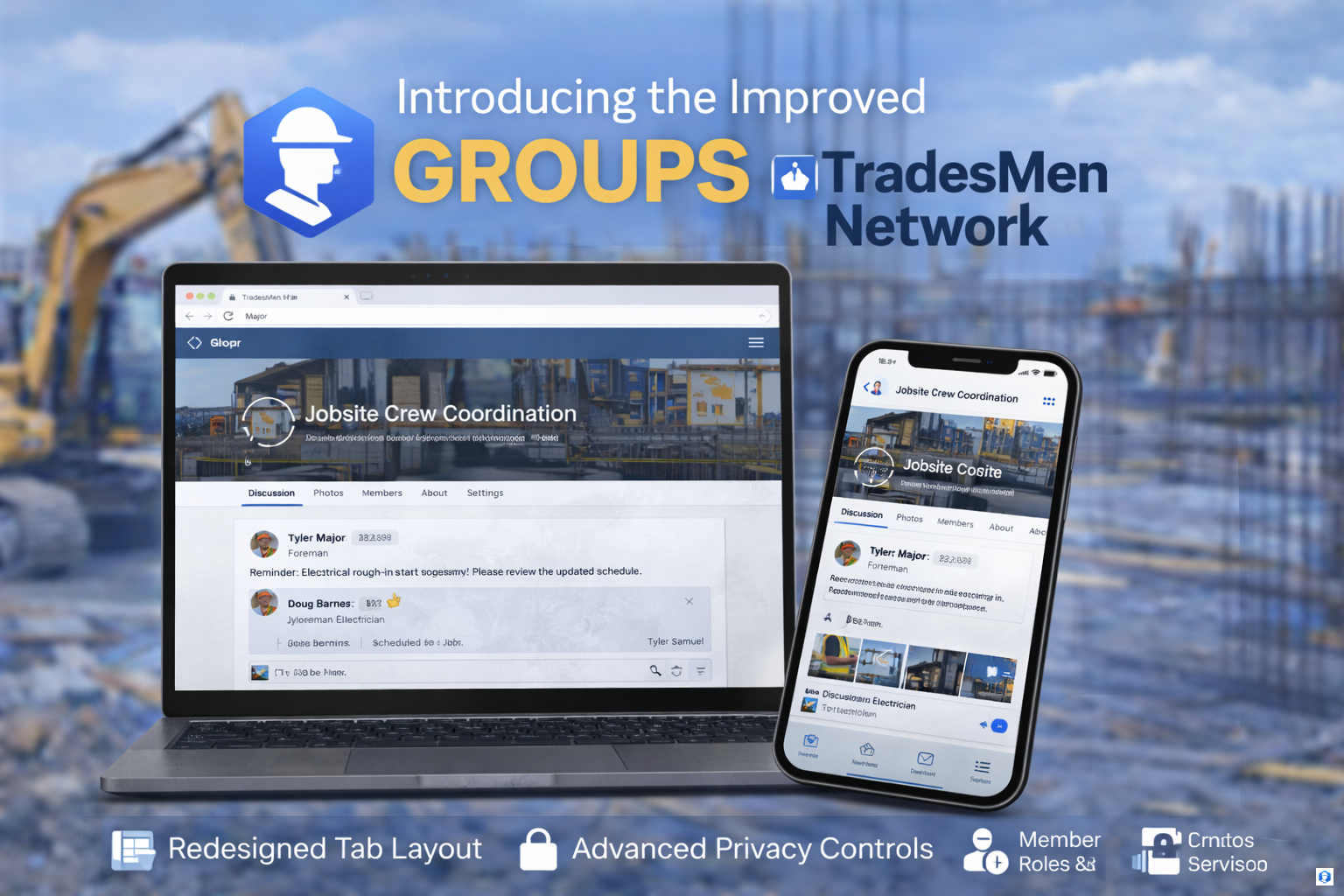
That’s why we’re excited to introduce the new and improved Groups feature on TradesMen Network.
This is not just a redesign.
This is a complete upgrade in functionality, control, and professional usability.
🔧 What Are Groups on TradesMen Network?
Groups are dedicated spaces where trades professionals and companies can:
-
Collaborate
-
Share industry knowledge
-
Post updates
-
Upload project photos
-
Organize teams
-
Manage private trade discussions
Groups allow you to create structured communities within the platform — whether that’s for a crew, a company, a trade specialty, or a regional network.
🎨 A New, Modern Layout
The Groups feature has been completely redesigned with a cleaner, Facebook-style professional layout that makes navigation simple and intuitive.
New Design Highlights:
📌 Clear Tab-Based Navigation
Each group now includes structured tabs for:
-
Discussion (Posts)
-
Photos
-
Members
-
About
-
Settings (for Admins/Owners)
This makes it easy to find exactly what you’re looking for without clutter.
📱 Fully Responsive Experience
The new Groups system is optimized for:
-
Desktop
-
Tablet
-
Upcoming iOS App
-
Upcoming Android App
Everything syncs seamlessly across devices.
🛠 Full Feature Breakdown
1️⃣ Group Types & Privacy Controls
Groups can now be configured with flexible visibility settings:
-
Public Groups – Anyone can view posts and join.
-
Private Groups – Membership approval required.
-
Hidden/Invite-Only Groups – Only invited members can see content.
Group owners have full control over visibility and member access.
2️⃣ Member Roles & Permission Matrix
Groups now support structured role-based permissions:
👑 Owner
-
Full control
-
Edit group details
-
Assign/remove admins & moderators
-
Delete group
🛡 Admin
-
Manage posts
-
Approve members
-
Moderate content
-
Edit group info
🔨 Moderator
-
Monitor discussions
-
Remove inappropriate content
-
Manage comments
👷 Member
-
Post content
-
Comment
-
Upload photos
-
Participate in discussions
This ensures professional-level control and organization within each group.
3️⃣ Enhanced Posting System
Group members can now:
-
Create rich posts
-
Attach photos
-
Comment on discussions
-
React to content
-
Share project updates
Posts are cleaner, easier to read, and better organized.
4️⃣ Group Photo Albums
The upgraded Groups feature includes improved photo services inside each group:
-
Organized project albums
-
Grid-style layouts
-
Faster image loading
-
Controlled visibility settings
-
Commenting and engagement options
Perfect for:
-
Crew project documentation
-
Training examples
-
Before/after showcases
-
Equipment sharing
-
Site coordination
5️⃣ Improved Join & Invitation System
The join and invite experience has been streamlined:
-
Simple “Join Group” buttons
-
Member approval notifications
-
Direct invite functionality
-
Clear membership status indicators
No confusion. No broken buttons. Clean functionality.
6️⃣ Admin Dashboard for Groups
Group owners and admins now have access to a clearer settings panel, including:
-
Group name & description editing
-
Privacy configuration
-
Member management
-
Role assignment
-
Content moderation controls
Everything is centralized and easy to manage.
🔒 Professional Moderation & Safety
To maintain a professional environment:
-
Content moderation tools are improved
-
Reporting systems are integrated
-
Admins can remove posts or members
-
Clear enforcement of community standards
TradesMen Network is built to stay professional and respectful.
🏗 Real-World Use Cases
Here’s how Groups can be used in the real world:
🔹 Company Internal Teams
Private groups for:
-
Crew coordination
-
Safety updates
-
Project timelines
-
Internal announcements
🔹 Trade-Specific Communities
Public groups for:
-
Plumbing professionals
-
HVAC specialists
-
Electrical discussions
-
Welding communities
🔹 Regional Trade Networks
Groups organized by:
-
City
-
Province
-
State
-
Country
🔹 Apprenticeship & Training
Groups for:
-
Mentorship
-
Skill development
-
Certification discussions
-
Industry exam prep
The possibilities are extensive.
🚀 Why This Upgrade Matters
The skilled trades industry thrives on collaboration, mentorship, and coordination.
The new Groups feature:
✔ Improves communication
✔ Strengthens industry networking
✔ Supports professional collaboration
✔ Allows structured team organization
✔ Enhances project documentation
This is about building real digital jobsite communities.
🔮 What’s Next?
This Groups upgrade is part of a broader evolution across the platform.
Upcoming improvements will continue to expand:
-
Notification systems
-
Cross-platform mobile integration
-
Advanced group search
-
Enhanced analytics for group admins
-
AI-assisted moderation tools
We are building Groups to scale with the future of the trades.
👷 Built for the Skilled. Built for Collaboration.
If you’re already on TradesMen Network:
👉 Create a group
👉 Join an industry group
👉 Invite your crew
👉 Start collaborating
If you haven’t joined yet:
👉 Visit TradesMenNetwork.pro
👉 Create your profile
👉 Become part of the trades community
The trades are stronger together — and now, your digital community is stronger too.

Comments
Log in or create an account to leave a comment.
No comments yet. Be the first to share your thoughts!